> ## Documentation Index
> Fetch the complete documentation index at: https://docs.openformat.tech/llms.txt
> Use this file to discover all available pages before exploring further.
# Leaderboard
> Create a leaderboard which includes the names and images of the users within your app, by linking to your database. This leaderboard is based off the amount of on-chain experience points (XP) the users have earned.
## Use cases
1. **Crowdfunding Platforms:** Display top donors or fundraisers in real-time, showcasing their contributions and profiles. This recognizes donors and encourages more generous contributions through social proof and competition.
2. **Educational Apps:** Create a leaderboard for top scorers or most active participants, motivating students to strive for higher rankings.
3. **Sales and Performance Dashboards:** Create leaderboards that rank sales personnel or other employees based on their performance metrics.
4. **Environmental Apps:** Create leaderboards that track and display user activities like recycling, volunteering hours or petition signatures. This can foster a competitive spirit that drives more significant contributions to the cause.
5. **Fitness and Wellness Apps**: Track and display community progress in challenges such as step counts or completed workouts. Showing participant details alongside their stats can encourage a healthy competition and community support system.
## Prerequisites
Before generating a leaderboard, ensure that at least one XP reward
transaction has been made. We recommend using the [Reward XP
Integration Template](./reward-user-xp) to reward XP before using
this template.
1. **Setup OPENFORMAT**
Before you can continue, please complete the following steps to obtain the necessary credentials:
1. **Go to the [OPENFORMAT Dashboard](https://app.openformat.tech)**
2. **Register** for an account
3. **Generate an API Key**
4. **Create a dApp**
5. **Create a Badge** (only if required)
2. **Database Table**
We've used Supabase as an example database, but you can use any
database you like.
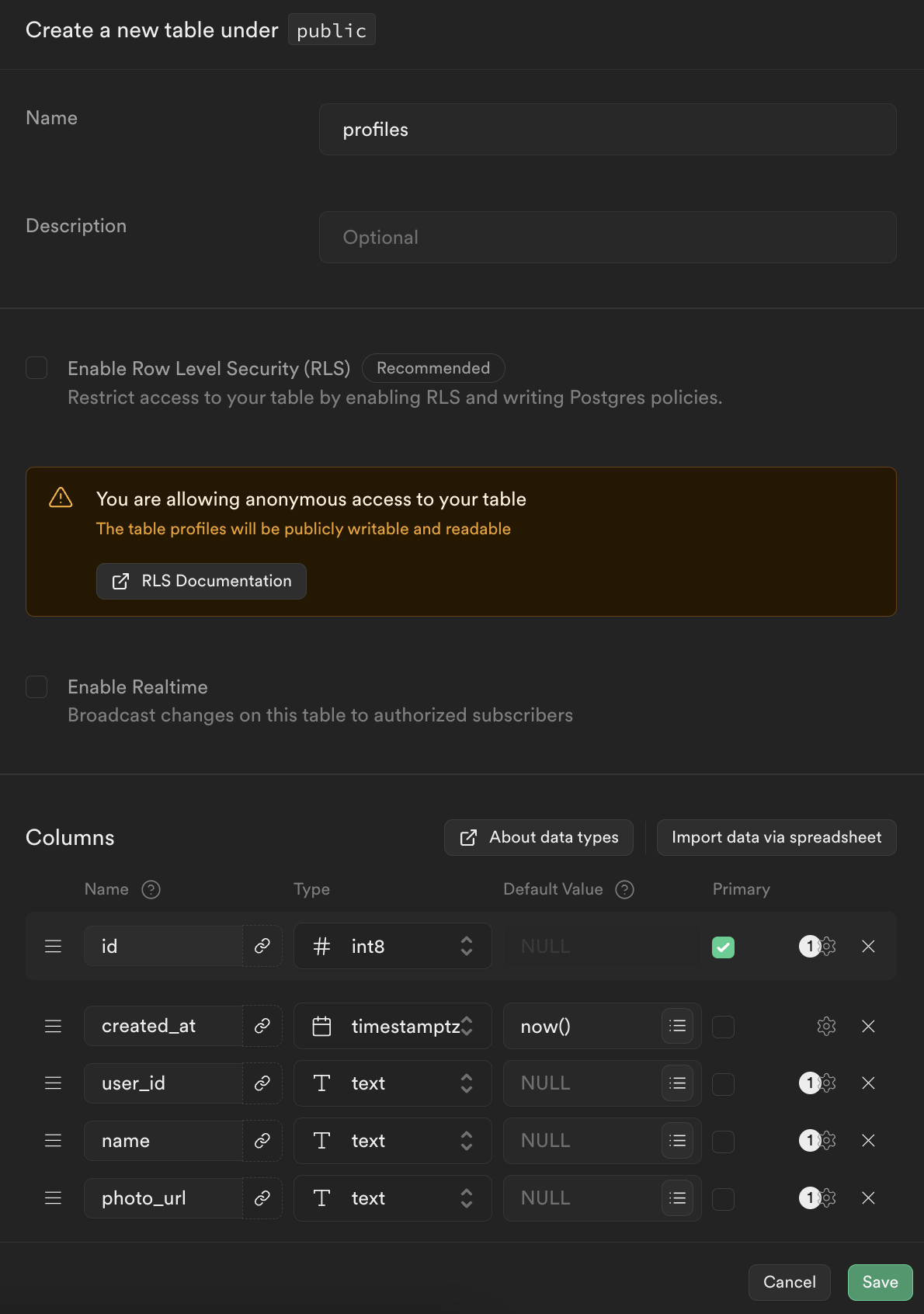
Have a table that associates a user with their web3 account. This example assumes a table called `profiles` with the fields:
* `user_id` the user id associated with
* `name` where the users display name is stored
* `photo_url` where the users profile photo is stored
Disable Row Level Security (RLS) for testing purposes only. We
highly recommend enabling RLS in any production environment to
ensure data security and integrity.
 ## Get Started
[Clone](https://buildship.app/remix?template=openformat-supabase-leaderboard)
this template in BuildShip.
Add your Supabase `API Key` and `API URL` to the Get Row and
Create Row node inputs.
Add your OPENFORMAT `API Key` into the Get Leaderboard node
inputs.
To test the integration, click on **Test** and add the `resultAmount`, `dappId` and `duration` to the query of the request.
## Node Inputs
### Get Leaderboard
| Key | Description |
| ---------------- | ---------------------------------------------------------------------------------------------------------------------------- |
| `API Key` | Your OPENFORMAT API Key. You can find this in the Settings page of the [Dashboard](https://app.openformat.tech) (String) |
| `dApp ID` | The ID of your OPENFORMAT dApp. You can get this in the [Dashboard](https://app.openformat.tech) (String, max 32 characters) |
| `Duration` | The time range that you want your leaderboard to cover. (String which accepts either: daily, weekly, monthly, yearly or all) |
| `No. of results` | The number of users shown in the leaderboard e.g. top 10, top 50. (Number) |
### Get Row
| Key | Description |
| ------------ | ----------------------------------------------------------------------------------------------------------------------------------------------------------------------------------------------------------------------------------------- |
| `API Key` | The API key for your Supabase database. You can find this in the API section of the Settings in the Supabase Dashboard (String) |
| `API URL` | The URL for your Supabase project. This can be found in the Supabase Dashboard. (String) |
| `Table Name` | The name of the table where you are storing the users profile information, the preset value here is profiles. (String) |
| `Filter` | The filter so that it only returns the row of the user linked to that account address, you can change the value from account\_address if you have a different name for the column where you are storing the users web3 accounts. (String) |
### Improve Leaderboard
| Key | Description |
| ------------------ | ----------------------------------------------------------------------------------------------- |
| `Leaderboard Data` | The leaderboard data returned by the `Get Leaderboard` node. |
| `User Profiles` | An array with all of the user profile information returned from Supabase by the `Get Row` nodes |
## Gotchas and Troubleshooting
### Custom Name and Images
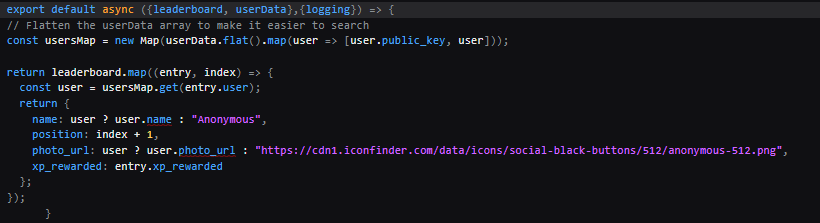
If you want to change the name or image that is returned when a user is not associated with an account address then you can edit the code within the `Improve Leaderboard` node. Simply change the text inside the quotations for `name` and `photo_url`.
## Get Started
[Clone](https://buildship.app/remix?template=openformat-supabase-leaderboard)
this template in BuildShip.
Add your Supabase `API Key` and `API URL` to the Get Row and
Create Row node inputs.
Add your OPENFORMAT `API Key` into the Get Leaderboard node
inputs.
To test the integration, click on **Test** and add the `resultAmount`, `dappId` and `duration` to the query of the request.
## Node Inputs
### Get Leaderboard
| Key | Description |
| ---------------- | ---------------------------------------------------------------------------------------------------------------------------- |
| `API Key` | Your OPENFORMAT API Key. You can find this in the Settings page of the [Dashboard](https://app.openformat.tech) (String) |
| `dApp ID` | The ID of your OPENFORMAT dApp. You can get this in the [Dashboard](https://app.openformat.tech) (String, max 32 characters) |
| `Duration` | The time range that you want your leaderboard to cover. (String which accepts either: daily, weekly, monthly, yearly or all) |
| `No. of results` | The number of users shown in the leaderboard e.g. top 10, top 50. (Number) |
### Get Row
| Key | Description |
| ------------ | ----------------------------------------------------------------------------------------------------------------------------------------------------------------------------------------------------------------------------------------- |
| `API Key` | The API key for your Supabase database. You can find this in the API section of the Settings in the Supabase Dashboard (String) |
| `API URL` | The URL for your Supabase project. This can be found in the Supabase Dashboard. (String) |
| `Table Name` | The name of the table where you are storing the users profile information, the preset value here is profiles. (String) |
| `Filter` | The filter so that it only returns the row of the user linked to that account address, you can change the value from account\_address if you have a different name for the column where you are storing the users web3 accounts. (String) |
### Improve Leaderboard
| Key | Description |
| ------------------ | ----------------------------------------------------------------------------------------------- |
| `Leaderboard Data` | The leaderboard data returned by the `Get Leaderboard` node. |
| `User Profiles` | An array with all of the user profile information returned from Supabase by the `Get Row` nodes |
## Gotchas and Troubleshooting
### Custom Name and Images
If you want to change the name or image that is returned when a user is not associated with an account address then you can edit the code within the `Improve Leaderboard` node. Simply change the text inside the quotations for `name` and `photo_url`.